Promoting Agent Configs Across Environments With Environment Variables
Build agent configs once, then promote the same artifact across environments using variables.
Agent configuration now lives in version control, not in a dashboard someone clicks through by hand, and that one shift forces a rethink of how a config moves from a laptop to production. The mechanism that makes the move safe isn't new: build the artifact once, promote that same artifact through each environment, and let environment variables carry whatever changes underneath it. Skip the env var seam and you're back to editing YAML by hand at 2am before a release, hoping you remembered which value belonged to which stage. This piece walks through how that pattern gets built for agent YAML, where it holds, and where it snaps if you cut a corner.
What environment promotion actually means for agent configs
Environment promotion means building an artifact once, then pointing that same artifact at progressively higher-stakes environments, running the same tests and health checks at every stop along the way. The YAML file itself never changes between dev, staging, and production. Agent logic stays put. Tool definitions stay put. The system prompt stays put.
What moves is routing: which environment is currently serving the artifact, and what values that environment feeds it at runtime, things like a database URL, an API endpoint, a secret, a feature flag. Nobody edits a file between stages. Nobody recompiles anything, and nobody resolves a merge conflict between a staging branch and a prod branch. Promotion is a flag getting flipped, not surgery.
This matters more for agents than for an ordinary web service, and here's why: a misconfigured agent often doesn't throw an error at all. A broken API call fails loudly, sends back a 500, gets noticed in minutes. A misrouted agent, one quietly pointed at the wrong model tier or the wrong tool endpoint, just produces the wrong output and keeps producing it, until a customer complains or someone happens to read the logs days later. That's a much harder failure to catch, and it's exactly why the promotion boundary has to be explicit, built into the system, rather than something a person is trusted to remember.
Most teams settle on three environments as a baseline: development, staging, production. The Microsoft 365 Agents Toolkit documentation (Microsoft Learn) lays out a version of this with a dedicated env folder holding paired files per environment, one for shared values and one for local secrets: .env.dev and .env.dev.user, .env.staging and .env.staging.user, .env.prod and .env.prod.user. Each file defines the same variable names with different values. Those names are the contract between the YAML and whatever environment happens to be running it.
Which values belong in the YAML and which belong in env vars
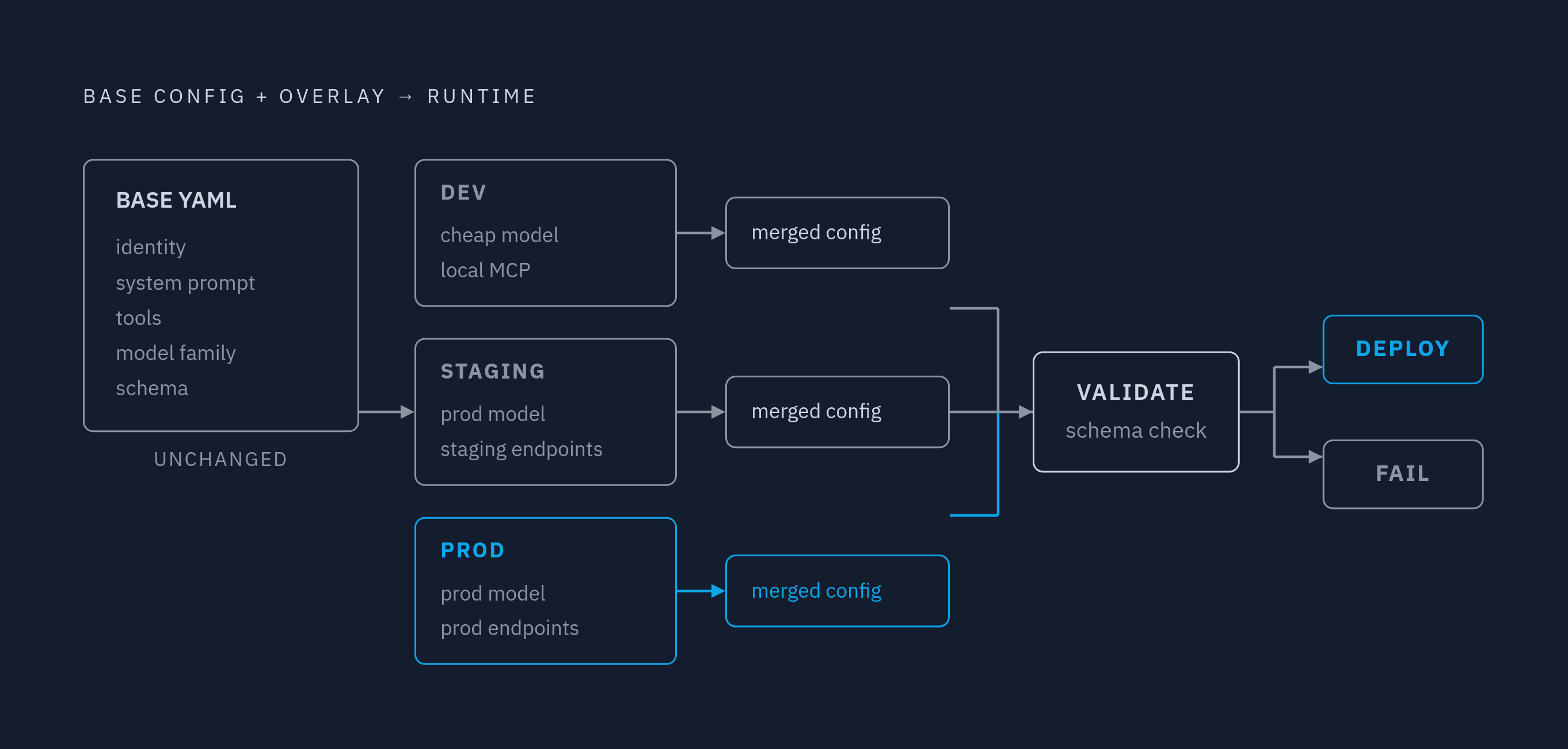
The YAML should hold whatever stays true no matter where the agent runs: its identity, the shape of its system prompt, its tool definitions, its model family, its behavioral limits, its schema. Env vars hold whatever changes by environment, or whatever should never sit in a repository at all: endpoint URLs, API keys, auth tokens, which model tier to run, feature flags, budget caps.
The overlay pattern described by channel.tel makes this concrete. A dev overlay points the agent at a cheaper model and a local MCP server for tool calls. A staging overlay swaps in the production model but keeps tool endpoints pointed at staging infrastructure. Production points everything, model and endpoints both, at the real thing. Same base YAML the whole way through, three different overlays sitting on top of it.
The merge step is where the safety actually lives, and skipping it is the single most common mistake teams make with this pattern: deep-merge the environment overlay onto the base config, validate the result against a schema, and fail the deploy outright if that validation doesn't pass. Skip that step and a broken overlay reaches production silently, and nobody finds out until the agent starts behaving strangely in front of a customer.
A simple test decides where a value goes: if it would show up as a difference in a git diff between the dev YAML and the prod YAML, it belongs in an env var, full stop. Secrets get a stricter rule on top of that. Production secrets never belong in .env.prod. That file holds non-secret values only; actual credentials live in .env.prod.user for local development, and in the CI/CD pipeline's secret store for automated runs. The .user files get excluded by .gitignore, not as a style preference but as a rule with zero exceptions.
One small habit pays off far more than it costs: put the environment name in the agent's display name for anything that isn't production, something like "PR Review Agent (Staging)." When a tester reports a bug, that label alone tells you which version they were talking to, no need to ask.
The file and folder layout that makes this pattern reviewable
The env folder convention from the Microsoft 365 Agents Toolkit (Microsoft Learn) gives most teams a working starting layout. agent.yaml sits at the base: committed, no secrets, nothing environment-specific baked in. Under an env/ folder, .env.dev holds dev endpoint URLs and other non-secret values, committed to the repo. .env.dev.user holds dev secrets for local runs and stays out of version control entirely. The same pair repeats for staging. For production, .env.prod holds endpoint URLs and other non-secret values and gets committed; .env.prod.user holds production secrets for local use only and never touches the repository.
That .gitignore The rule is mandatory. It's structural. Every *.user file needs to be listed there, and any CI system with auto-commit behavior needs to be checked against that rule before it runs anywhere near this folder.
Naming variables with a consistent prefix per category gives the schema validation step something concrete to enforce: which variables are required in which environment, and which ones should never appear in a committed file, period. The CI/CD pipeline injects the SECRET_* variables from the secret store at runtime, so no secret value ever sits in a file inside the repo, committed or not.
The payoff shows up fastest for new developers. Getting a working local setup down to filling out one .env.dev.user file substantially reduces what used to be a multi-step onboarding process. The same layout lets a team run two versions side by side, v1 and v2, against the same production tenant for a real-user pilot, without forking the YAML at all. Promotion becomes --env prod. A flag, not a file edit.
Wiring env vars into agent YAML: the reference and validation layer
The YAML references env vars by name, using whatever interpolation syntax the runtime supports, ${AGENT_TOOL_URL} or ${{ env.AGENT_TOOL_URL }} depending on the tooling. The YAML defines the shape of the config; the env file supplies the actual value once the pipeline runs.
Take a tool definition: the YAML names the endpoint as a variable reference, and the dev env file resolves that to a local MCP server while the prod env file resolves the exact same reference to the production endpoint. One YAML file, two completely different runtime behaviors, depending on which env file loaded underneath it.
Model selection works the same way. Set AGENT_MODEL=claude-sonnet in dev and AGENT_MODEL=claude-opus in prod, and the YAML just reads ${AGENT_MODEL}. No YAML edit needed to run a cheaper model in development while production stays on the model that's actually been validated.
Schema validation is where this either holds together or falls apart. The merge function has to validate the resolved config, base YAML plus environment overlay, against the schema before any deploy is allowed to proceed. Fail the deploy. Don't let a broken config through quietly and hope it gets caught downstream.
Microsoft Foundry's description of this pipeline shape (May 2026) lays out the sequence: every push or pull request triggers the pipeline, static checks run first (lint, security scan, schema validation against the agent YAML), then unit and tool tests, then an evaluation gate that fails the whole pipeline if quality thresholds are breached, and only after all of that does an image get pushed. Prompt-based agents skip the Docker build step entirely, since there's no container to build, but the YAML and prompt bundle still get validated against schema and run against golden evaluation datasets.
This matters more than it might seem, because agents themselves are now writing this YAML, at scale. The AIDev-pop dataset (arXiv 2601.17413, updated October 28, 2025) tracked 33,596 pull requests created by five AI agents across GitHub repositories, and found 711,923 file changes across 8,031 of those PRs, spanning 1,605 repositories, where an AI agent had modified YAML files directly. Agents editing CI/CD YAML at that volume is already the operational reality, not a future risk to plan around. An agent that can write YAML can just as easily break the schema, which is exactly why the validation gate can't be optional, or advisory, or something a reviewer eyeballs before merging.
How the CI/CD pipeline becomes the promotion mechanism
Once the config layer and the env var layer are both in place, promoting a change from staging to production stops being a manual step someone remembers to do and becomes a workflow trigger instead. One workflow, run as a matrix across dev, staging, and prod, replaces three separate pipelines that would otherwise drift apart from each other over time, usually within a few months.
At each matrix run, the pipeline loads the right .env.{environment} file, injects SECRET_* values from the secret store at runtime, and validates the merged config before pushing anything downstream. The gate is the same test and health-check suite at every stop, and an artifact only advances if it clears that gate. An agent that fails schema validation or misses an evaluation threshold in staging simply never reaches production. That's the entire point of the gate.
Every pipeline run leaves an audit trail behind it: which env file loaded, which secret store values got injected, which validation steps passed or failed, and which commit or trigger kicked the whole thing off. Tracking environment as a field on every conversation the agent has lets teams filter analytics and conversation history by deployment stage, so staging behavior gets compared against production behavior before a promotion happens, not after a customer notices something is off.
The same matrix setup makes running two versions concurrently a configuration choice instead of a code fork. Version becomes a variable in the pipeline, not a separate branch of the YAML sitting off to the side.
Security boundaries that env var promotion must enforce
The pattern brings its own risk right alongside its benefits, and pretending otherwise is the second most common mistake after skipping validation. A misconfigured env var, a production secret accidentally loaded into staging, a staging endpoint accidentally promoted into production, any one of these can send an agent to take real actions against the wrong system entirely. That edge case is not hypothetical. It's the direct, predictable consequence of the seam this whole pattern depends on.
Each environment needs its own scoped credentials, minted with only the permissions that environment's agent actually needs to do its job. Dev credentials shouldn't be able to reach production endpoints, period, and production credentials should never sit in a local env file on someone's laptop. Credentials injected at pipeline runtime should also get revoked the moment the session ends. A long-lived credential sitting in an env file is a standing attack surface. A credential scoped to one session and killed after is not.
The .user file gitignore rule deserves to be treated as a security control, not a tidiness convention. A committed .env.prod.user file is a secret leak, full stop, not a configuration mistake to quietly patch up later.
The OWASP Top 10 for Agentic Applications (December 2025) names risks that this env var boundary addresses directly, including tool misuse and identity and privilege abuse, where an agent uses credentials scoped well beyond what its task actually requires. Seen against that backdrop, the env var seam is a genuine architectural boundary, not a deployment convenience. It's load-bearing part of the agent's security posture, not decoration around it.
There's a regulatory clock attached to this too. The EU AI Act introduces resilience requirements for high-risk AI systems, and the action layer an agent touches, every API it calls, falls within the scope of that regulatory framework. The promotion boundary is exactly where a team enforces which endpoints each environment's agent is allowed to reach. One practical control follows straight from this: prefix every secret variable with SECRET_, and enforce in schema validation that no SECRET_-prefixed variable ever appears in a committed env file. Fail that at the lint step. Don't wait until deploy to find out.
Running this pattern on managed infrastructure versus managing it yourself
Everything described so far runs on any CI/CD platform, GitHub Actions, GitLab CI, CircleCI, whichever a team already has in place. The env file layout, the secret store wiring, the validation pipeline, the sandbox configuration: all of it can be built and owned in-house, and plenty of teams do exactly that.
Owning it that way means owning everything underneath it too: sandbox isolation for each agent session, minting and revoking credentials on schedule, setting budget caps per environment and per session, logging every tool call in full, and storing an audit trail that holds up when someone actually reviews it. Once agents start making real tool calls against real systems, that work stops being optional. It gets done, either by the team itself or by a platform standing in for them.
That overhead doesn't stay flat as usage grows, either. It compounds. Stripe's agents now generate roughly 1,300 pull requests a week, up from roughly 300 pull requests per week before agent integration, representing a 4.3x increase in engineering velocity. At that kind of volume, managing sandboxes by hand, rotating credentials manually, and maintaining audit logs the old way stops being a side task. It becomes its own full-time engineering workload, and treating it as anything less is how teams end up with stale credentials sitting live in production for months.
A managed platform, by contrast, typically provides hard budget caps per session, per developer, and per time period; full visibility into every tool call, every diff, every token spent; and audit trails tied directly to whoever or whatever triggered the session. Teams that want the promotion pattern without also building and running that runtime infrastructure themselves are the clear fit for a managed platform. Teams that already have CI infrastructure in place, and the engineering headcount to own credential lifecycle and audit storage on their own, can run the whole pattern on their own systems just as well, and often prefer to. Either path uses the same config model underneath: YAML in the repo, env vars as the promotion seam. The platform choice changes who manages the runtime. It doesn't change how the config itself gets designed.
Practical starting point: adopting the pattern incrementally
Start with one environment variable, not ten. Pick whatever's most likely to leak or drift, usually a tool endpoint URL or a model tier setting, and move just that one out of the YAML and into an env file. Confirm the interpolation actually works, confirm the schema validation catches a bad value when you feed it one on purpose, and only then add the next variable.
Set up the .gitignore rule before writing a single .user file, not after. That ordering matters more than it sounds like it should: a secret committed once during setup and later removed from the repo still sits in the git history, fully recoverable by anyone who runs git log.
Build the schema validation step before the promotion pipeline, not alongside it, and definitely not after. A pipeline that promotes an unvalidated config quickly is worse than a slow pipeline that actually catches problems, because speed without validation just moves the failure further downstream, closer to production, where it costs more to fix and more people notice.
Expect this to take more than one attempt to get right, because it will. Most teams find their first env var split still leaves something in the YAML that should have moved out, or misses a secret that should have used the SECRET_ prefix from day one. That's normal, not a sign the pattern is broken. The value here lies in the direction it sets, independent of a clean implementation on day one: a seam that exists at all, reviewable, testable, auditable, beats a system where the right values to change before a launch live only in one person's memory.