Triggering Agents From Slack Commands in Engineering Workflows
Slack Code lets teams trigger coding agents from chat, keeping work visible and scoped.
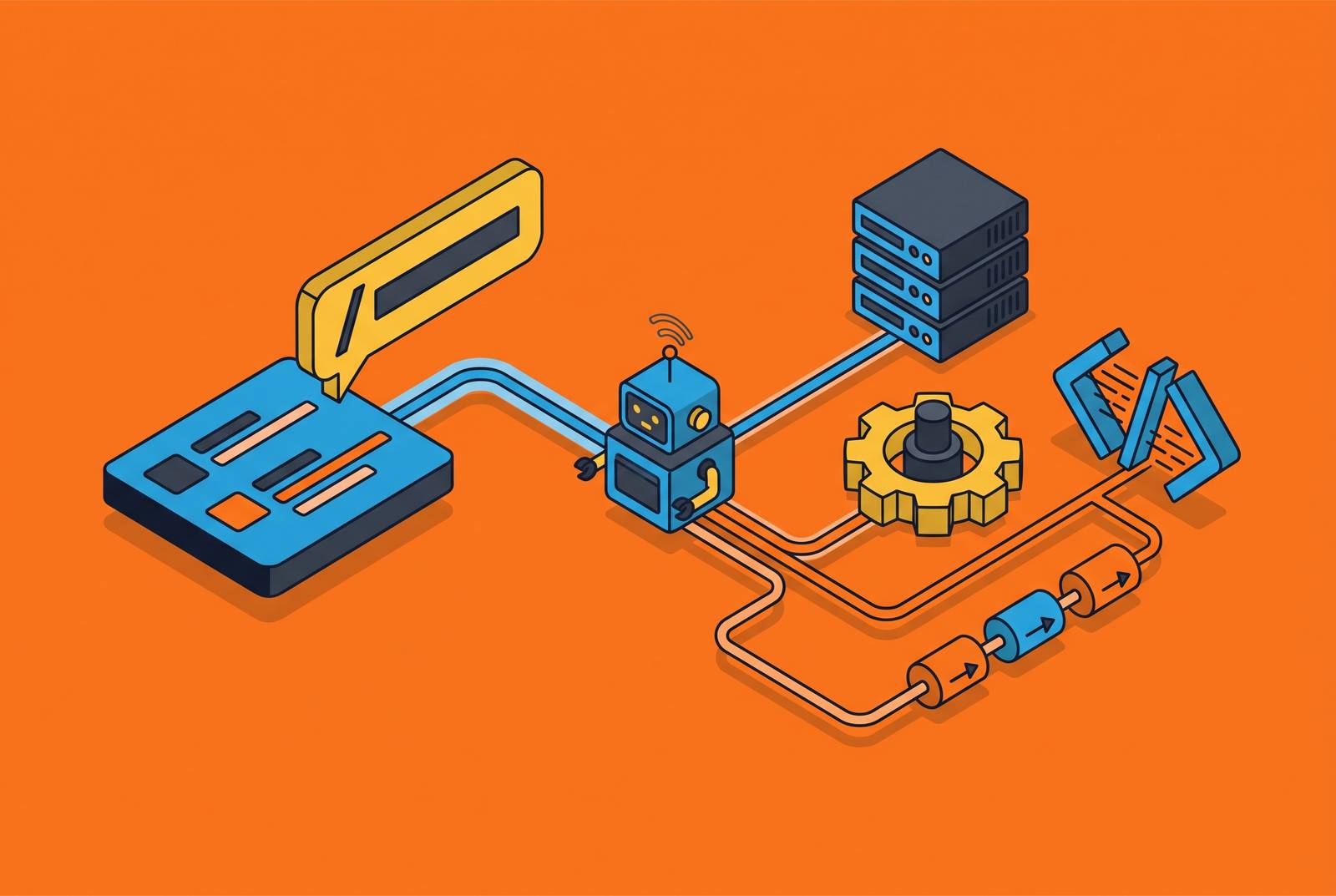
Bug reports land in Slack before they land in a ticketing system. Feature requests get argued out in a thread three days before anyone opens a pull request. Architectural debates happen in channels, get resolved, and then someone has to go translate the outcome into a ticket in a tracker that nobody reads as carefully as the original conversation. Slack was already where software work started, long before any agent showed up to do it.
What changed is the scale at which agents now sit inside that workflow. A growing share of organizations, 57% by recent count, use agents to run multi-stage workflows rather than single-shot tasks, and 16% have pushed agents into cross-functional processes that touch multiple teams at once. Before that point, the trigger surface was a minor UX detail. Once agents start acting on production systems instead of drafting suggestions, the interface where a human hands off a task carries as much weight as the model doing the work. A well-scoped trigger paired with a mediocre model wastes some tokens. A badly scoped trigger paired with a great model can touch repositories, secrets, and production systems it was never meant to reach, and that second failure mode is the one that should cost you sleep, not the first.
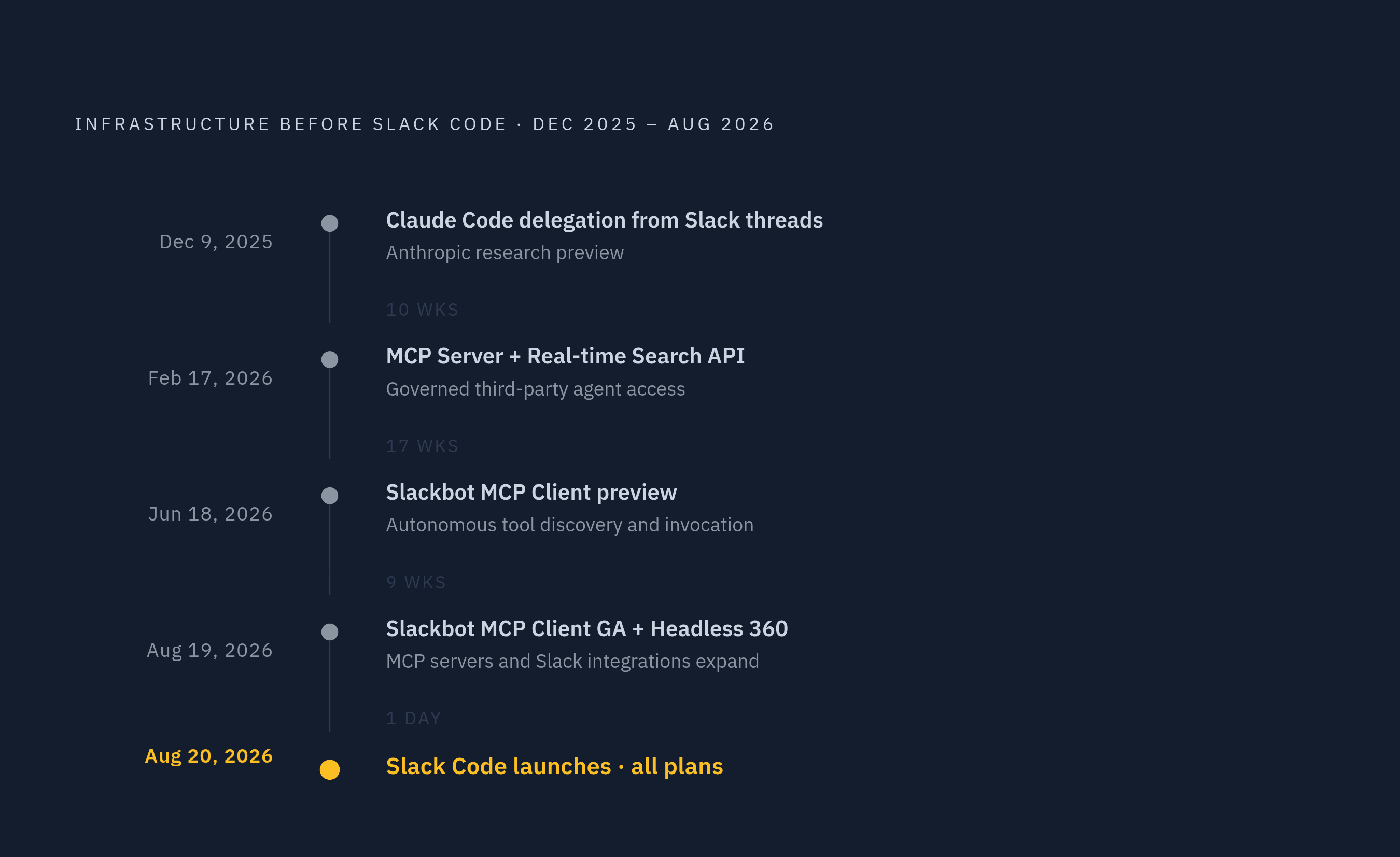
Slack Code, launched August 20, 2026 and available on all Slack plans, makes the trigger explicit. Tag a coding agent in a conversation, and Slack provisions a project-specific code channel scoped to that task, no separate tool, no context switch. That capability didn't appear all at once. Anthropic ran a research preview starting December 9, 2025 that let users delegate tasks to Claude Code directly from Slack threads. Slack followed on February 17, 2026 with a Model Context Protocol server and a Real-time Search API, built specifically to give third-party agents governed access rather than an open door. By June 18, 2026, the Slackbot MCP Client let developers connect MCP servers to Slack so Slackbot could discover and invoke tools on its own based on what a user typed, and that client went generally available on August 19, 2026. Salesforce's Headless 360 expansion, announced August 19, 2026, added further MCP servers and Slack integrations on top of that base. Slack Code is the visible product. The eight months before it were the plumbing, and skipping straight to the product without understanding that plumbing is how teams end up surprised by what the trigger can reach.
The Mechanics of Agent-Triggered Code Channels in Slack Code
The basic unit here isn't a chat message, it's a channel. Someone tags an agent, and the agent responds by creating a channel scoped to that one task, a dedicated workspace that exists for as long as the task does.
Inside that channel, Slack organizes the work into four tabs. The Conversation tab holds the shared context the agent is drawing from, the paper trail of what was said and why. The Plan tab shows the agent's proposed sequence of actions before it takes any of them, so a reviewer can catch a wrong assumption before code gets touched. The Code diffs tab shows line-by-line changes, reviewable by anyone in the channel, not just the person who tagged the agent. The Live preview tab renders running output, an HTML preview in most cases, so the team can see the result before signing off.
A tag provisions the channel, work proceeds with the whole team watching, a human has to approve before anything ships, and the channel archives itself once the task closes, with the log preserved rather than deleted. Salesforce's own documentation walks through a representative case: a product manager spots a bug report in a channel, tags the agent, and the agent spins up a code channel, reads the surrounding conversation, screenshots, and shared docs, then proposes a fix. An engineer reviews the diff and the live preview, approves it, and a pull request opens. No ticket gets filed, no meeting gets scheduled. The whole loop happens inside the channel where the bug was first mentioned.
What the trigger surface inherits
Agents triggered through Slack Code inherit Slack's existing permission structure. IT doesn't provision a new identity for the agent, it operates under the access of the user who invoked it. If a user can't reach a given repository or dataset, neither can the agent acting on that user's behalf.
That inheritance carries real teeth. Anyone in the channel can pause, redirect, or stop an agent mid-task, not just the person who started it. High-stakes actions, production merges in particular, require explicit human sign-off before execution, not after. Slack's redesigned interface adds an Agents tab that lists active agents and sessions, so a team lead can browse what's running and check status without hunting through channels. Controls are available to let anyone kill an active agent stream on the spot.
That's a meaningful amount of control, and treating it as the whole solution is the mistake most teams make. Slack Code gives you visibility and a kill switch. It does not substitute for separately enforced execution sandboxing, token-level spend caps, or a purpose-built audit log. Slack's permission model ties agent access to the invoking user's existing permissions, so it does not automatically narrow credentials to the scope of a specific task. The compute environment where the agent actually runs code sits outside Slack's control. And the archived channel log may not constitute a complete tool-call and diff record attributable to a specific trigger event in the way a purpose-built audit system would. Those four gaps are where governance has to get built on top. Assuming Slack Code already covers them is the single most common misreading of what this product does.
The governance controls a Slack trigger needs before it reaches production
Human-in-the-loop approval and inherited permissions are necessary. They are not sufficient, and treating them as sufficient is how a scoped-looking feature ends up with an unscoped blast radius. Production use asks for three additional layers, each addressing a different failure mode.
The first is scoped credentials. A credential should get minted the moment an agent session starts, limited only to the repositories and services that specific task requires, and revoked automatically the moment the session ends rather than lingering in the agent's environment. Skipping this step causes every triggered session to inherit the same blast radius as the broadest permission set anywhere in the stack. The whole exercise of scoping stops meaning anything.
The second is sandbox isolation. Each triggered session should run in its own execution environment, with no shared state carried from one task into the next and no agent retaining context across unrelated jobs. The OWASP Top 10 for Agentic Applications 2026 names tool misuse, identity and privilege abuse, and insecure inter-agent communication among the leading governance risks in this category, and sandbox isolation is a structural control that bears directly on all three. It's also the control that limits damage when something goes wrong: coding agents have wiped out codebases during live sessions before, and a sandboxed session confines that failure to itself instead of letting it propagate outward.
The third is a budget cap enforced at the trigger, not reviewed after the invoice arrives. Agentic models burn through tokens at a multiple of what a single developer's manual session would use, since the agent reasons, retries, and calls tools in ways a human simply wouldn't. A trigger firing without a cap can exhaust a budget across many parallel sessions before anyone notices the pattern. Caps need to be configurable at the session level, on top of whatever ceiling gets set once at the organization level.
The blast radius problem when Slack triggers meet broad permissions
OWASP's 2026 list ranks agent goal hijack, identity and privilege abuse, and tool misuse and exploitation among the top risks facing agentic systems, and all three have a direct path through a Slack trigger. This is the part of the architecture that deserves the most skepticism, not the least, because most teams wave it through without a second look.
Start with goal hijack, ranked ASI01, the top risk on OWASP's list. A malicious or simply poorly worded message in a channel can redirect an agent's objective mid-task, and a public or semi-public Slack channel is a far wider attack surface for this kind of prompt injection than a private terminal session ever was. Anyone who can post in the channel has a shot at steering the agent, intentionally or not.
Then there's amplification. If the user who triggers the agent has write access across several repositories, the agent inherits every bit of that access. A request misunderstood by even a small margin can produce changes across repositories the original message never intended to touch, which makes the permission model governing an agent a central piece of the organization's overall security posture.
A recent Dark Reading poll found that a significant share of cybersecurity professionals rank agentic AI as the top attack vector heading into 2026, ahead of deepfake threats, ahead of board-level cyber attention, ahead of passwordless adoption. Most organizations still have limited visibility into what permissions their agents actually hold or what data those agents can reach at any given moment. That gap between perceived risk and actual visibility is the whole problem, condensed.
The Agent Configuration Needed for a Slack-Triggered Workflow
Configuration belongs in the repository, full stop. It should be reviewed and versioned the way any other code change is reviewed and versioned, not set through a UI panel that lives outside version control and outside the pull request process where the rest of the engineering team can weigh in.
A Slack-triggered agent's configuration has to spell out which repositories it may read from and write to, which tools it's allowed to call (a CI system, a secrets manager, an issue tracker) and under what scope, and what its spend caps are: a maximum token count with a hard stop once that ceiling hits. It needs to name which Slack channels or which specific users are authorized to trigger it in the first place, because trigger authorization is an access control decision, not a convenience toggle. And it has to specify which intermediate actions require human approval along the way, including the steps that come before the final merge.
Two paths can live in the same workspace without conflict. A team might build a custom agent on a lower-level SDK while running Claude Code sessions through a managed platform that already has governance baked in. Neither approach is wrong on its own; they solve different problems. What matters is that wherever the configuration lives, it functions as the actual governance artifact: a security reviewer audits it, version control tracks it over time, and the audit trail points back to it whenever a session fires.
The cost dimension of Slack-triggered agent runs
The convenience of Slack Code is also its financial exposure. A non-engineer tagging an agent in a channel to fix a small bug is exactly the kind of workflow the product is built to enable, and it's a legitimate one on its own. But each tag is a billable agent session, and once dozens of people across a large team start doing this in parallel, the sessions accumulate faster than anyone tracking cost on a monthly cadence is likely to catch in time.
The multiplier effect makes this worse, not better. Because agentic models consume tokens well beyond what a single manual coding session would, a trigger firing repeatedly across many channels can burn through a budget in a way no lone developer working locally ever could, no matter how long that developer's session ran.
Uber's experience after rolling out Claude Code broadly makes the pattern concrete. Usage roughly doubled within two months of the rollout, and by April the company had burned through its entire 2026 AI budget just four months into the year. The CTO's response afterward: back to the drawing board. That's a spend cap that didn't exist until the money was already gone, and it previews what happens to any team that treats Slack Code's ease of use as a reason to skip the same discipline. A trigger fired without a cap is a budget event waiting for a date. The cap has to be enforced at the session level, before the session runs, not tallied up after the month closes and the number is already final.
The end-to-end pattern: from Slack command to governed agent run and back
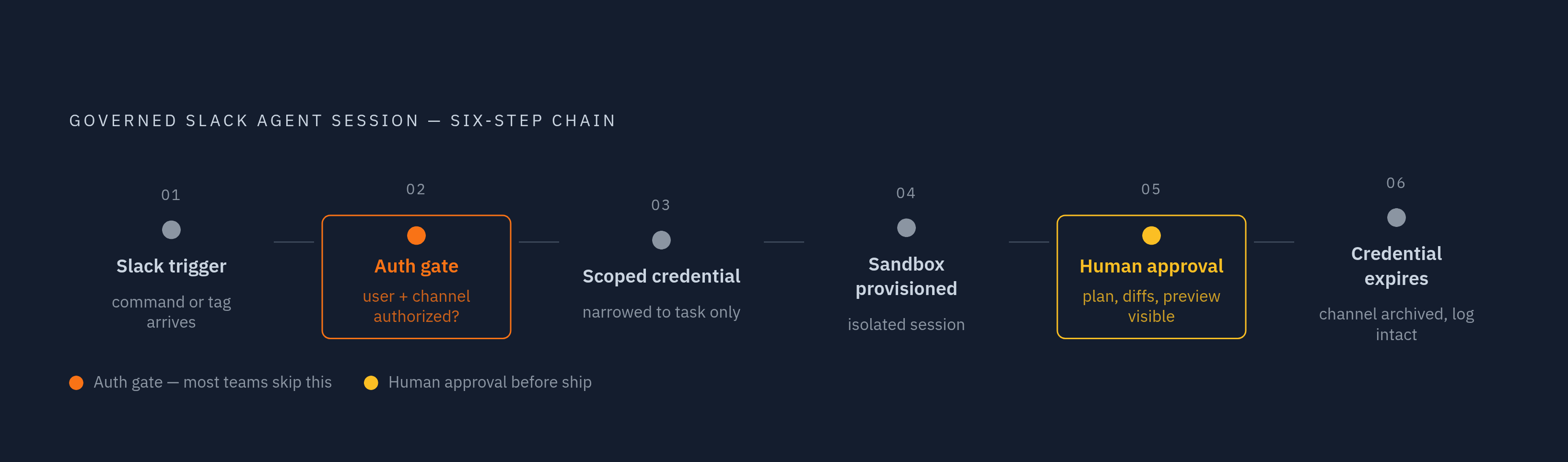
Putting the pieces together, the chain looks like this. A Slack command or an agent tag arrives in a channel, and before anything else happens, the system checks that the invoking user and the channel itself are authorized to trigger that particular agent. Trigger authorization is the first gate, not an afterthought bolted on later.
Once authorized, the system mints a fresh credential scoped narrowly to what the task requires, nothing broader, and hands the agent a sandboxed environment isolated from any other session running elsewhere in the organization. The agent works inside its Slack code channel exactly as Slack Code's own mechanics describe: drafting a plan, proposing diffs, rendering a live preview, all visible to the team in real time. A human reviews and approves before anything ships to production, the credential expires the moment the session ends, and the channel archives itself with the log intact, leaving a record that survives long after the conversation that started it has gone quiet.
None of this is exotic. It's the same governance discipline applied to any other automated system with write access to production, just applied to a trigger surface that happens to look like a chat message. Organizations that treat Slack Code as a governed extension of their existing access control model get the speed the product promises. Organizations that treat it as a shortcut around governance find out quickly how fast that shortcut turns expensive.t around governance find out, the way Uber did with its budget, how fast that shortcut turns expensive.